Information Transfer
Visualize Objects
- All object's display mode can be changed from shaded to wireframe to better visualize the design and its details and make the design easier to manage by not hiding elements one by one.
LINK Dashboard
- The document text about the design and user text of each object is also categorized and visualized in a dashboard allowing to see total values (since the user text is not operable )and it is easier for user to see the changes in design rather than going through panels and looking for the value
User Text
- Every item in the model carries detailed information, including weight, material, and cost.
- This enriches the geometry with meaningful data and supports a BIMesque workflow within the parametric environment, enabling informed, data-driven design decisions.
Layout
-
Layout pages are created automatically based on the drawings are in the project. These pages can the following drawings:
- 3D View
- Table of Information
- Support Unfold
- Glass Unfold
- Step Cover Unfold
- Exploded Step
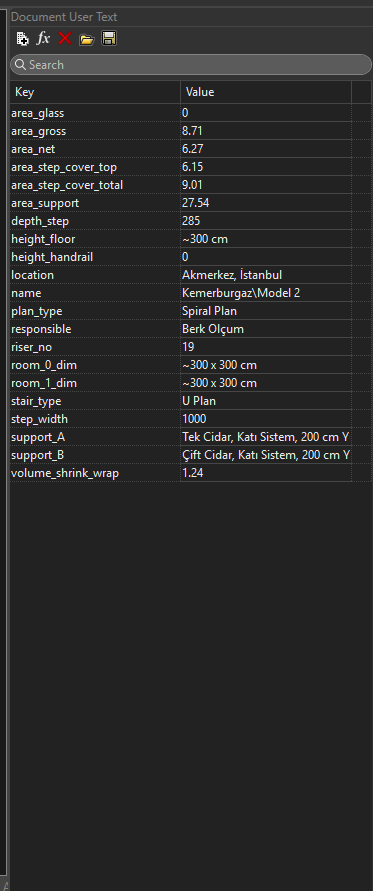
Document User Text
- Information from the UI, along with calculated values, is recorded to the Rhino file as document user text.
- This allows the data to be stored directly within the model, so it can be read and recalled in future sessions—enabling continuity across design iterations and simplifying version tracking.
Export to CAM
- Each steel component of the stair is unfolded into 2D, categorized by type, and labeled with its corresponding name directly engraved onto the part.
- These drawings are exported as DWG files and prepared for nesting, streamlining the fabrication process and ensuring precise part identification during cutting and assembly.